The prompt optimizer that learns from failure, not just scores.
Part 3 of 3 — The Foundation Series on Prompt Engineering
If you haven’t read Article 2 yet, start there. This article assumes you know what a DSPy Signature, Module, Metric, and optimizer are.
Where we left off
In Article 2, we built a customer care chatbot using DSPy with MIPROv2. The workflow was:
- Write Signatures
- Collect 30–50 labeled examples
- Define a metric
- Run MIPROv2
- Get a compiled JSON
- Deploy
MIPROv2 is powerful. It rewrites your instruction text, selects the best few-shot examples, and uses Bayesian search to find the best combination. For most teams with clean labeled data, it is the right tool.
MIPROv2 works best when you have labelled examples or a reliable evaluation metric.
However, many real-world tasks lack clear reference answers. In such situations, GEPA shines because it can optimise prompts using natural-language feedback that explains why an output succeeded or failed, rather than relying solely on labelled outputs or scalar scores.
These natural language feedback can be done using another LLM model as a judge instead of labelling the data.
What is GEPA?
GEPA stands for Genetic-Pareto (not burrito — though if my son is reading this, he is already heading to the kitchen). It is a prompt optimizer published at ICLR 2026 — one of the top ML research venues — by researchers from UC Berkeley, Stanford, MIT, and Databricks. It is available in DSPy as dspy.GEPA.
The core idea in one sentence:
Instead of asking “which prompt scores highest?” GEPA asks “what went wrong — and how do I fix it?”
It reads your LLM’s full execution trace, diagnoses failures in natural language, and evolves targeted fixes. A handful of well-diagnosed runs go much further than thousands of random ones.
How GEPA works — the 5-stage loop
Architecture: From GEPA: Reflective Prompt Evolution Can Outperform Reinforcement Learning – ICLR 2026
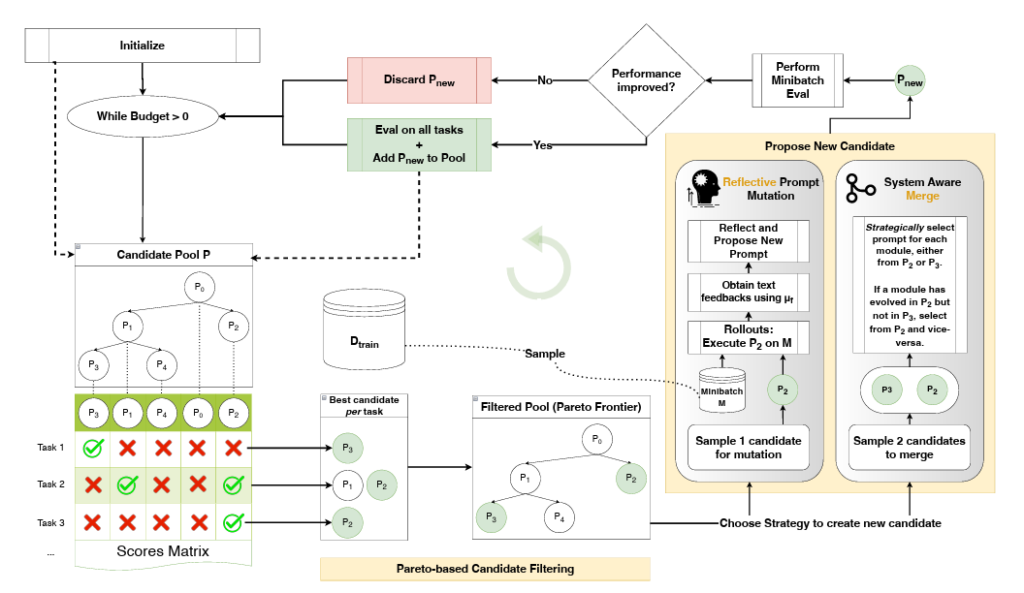
Stage 1
Select candidate
Pick a parent prompt from the Pareto frontier
›Stage 2
Run minibatch
Run on 3 examples, capture full execution traces
›Stage 3
LLM reflects
Reads traces, diagnoses exactly what went wrong
›Stage 4
Mutate
Proposes a new prompt that fixes the diagnosis
›Stage 5
Pareto check
If it excels on any example, it joins the frontier
Repeat until rollout budget is exhausted. The Pareto frontier only grows with genuinely better candidates.
Let me unpack what makes each stage special.
Stage 1 — Select from the Pareto frontier
GEPA does not pick randomly. It maintains a pool of candidate prompts — the Pareto frontier — and selects the one that is the sole best on the most examples. This balances using what already works with exploring new strategies.
Stage 2 — Run a minibatch
GEPA runs the selected candidate on a small batch of examples (default: 3) and captures the full execution trace — the prompt sent, the LLM’s reasoning steps, any tool calls, the final answer, and the metric score.
Stage 3 — LLM reflection
This is where GEPA is fundamentally different from every other optimizer. The reflection step has four sub-steps:
3a — Pick what to improve (round-robin) GEPA does not just fix the weakest module. It takes turns improving each module in the pipeline — the retriever, the reasoner, the generator — one at a time, in rotation. Every module gets attention, not just the one that looks worst right now.
3b — Read the trace, not only the score (ASI) After running the minibatch, GEPA collects what the paper calls Actionable Side Information (ASI) — the full execution trace for each example, including error messages, profiling data, and reasoning logs. Not just a pass/fail score.
Compare what a traditional optimizer knows vs what GEPA knows:
| What RL / MIPROv2 gets | What GEPA gets (ASI) |
|---|---|
| Score: 0 | Score: 0 + “the model confused ‘I’ve changed my mind’ with cancel_order instead of general_query because the instruction doesn’t cover indirect phrasing” |
| Score: 1 | Score: 1 + “the model correctly identified the escalation signal from ‘third time contacting’ even without explicit anger words” |
3c — Feed everything into a Meta-prompt All of it — the traces, error messages, the current prompt, and the diagnosis — gets assembled into a meta-prompt. This meta-prompt was written once by the GEPA authors and never changes. Think of it as a job description handed to a consultant:
“You are a prompt engineer. Here is the current prompt. Here is the execution trace. Here is what went wrong. Write a better prompt.”
The optimizer LLM (GPT-4.1, Qwen, or similar) reads this meta-prompt and produces a new, improved prompt.
3d — Fix the problem in the new prompt The output is a targeted fix — not a random rewrite. Because the optimizer LLM read the full trace and the specific diagnosis, the change it makes is precise. It addresses exactly what broke, not a general guess at improvement.
Stage 4 — Targeted mutation – Genetic
The new prompt is not just an improved version of the current one. It inherits the full mutation history of every ancestor that came before it. This is the “Genetic” in GEPA’s name.
When GEPA picks a prompt and sends it to the optimizer LLM for mutation, it includes the entire lineage — every previous version, what problem it had, and what was changed to fix it:
Mutation history passed to the optimizer LLM
P1
→
P120
Problem: instruction didn’t handle indirect phrasing like “I’ve changed my mind”
Fix: added guidance for ambiguous cancellation signals
P120
→
P240
Problem: missed escalation without explicit anger words like “unacceptable”
Fix: added recognition of repeated-contact signals
P240
→
P1000
Problem: confused general queries with refund requests when order IDs were missing
Fix: added rule to check for transaction evidence before classifying refund
P1000
→
P2010 ← new
Optimizer LLM reads the full history above before writing P2010
It knows not to drop any of the three previous fixes
Every descendant inherits all lessons from its ancestors. GEPA never forgets what it already learned — unlike RL which can drift away from past gains.
This is what makes GEPA so sample-efficient. One rollout plus one reflection produces one explicit, permanent lesson. In RL, the same rollout produces a tiny nudge to billions of opaque weights that no one can read or audit.
Stage 5 — Pareto check
The new prompt is evaluated. If it achieves the best score on any example, it joins the Pareto frontier. If it beats an existing candidate on every example, that weaker candidate is removed. The frontier stays lean and diverse.
The Pareto frontier — why it matters
Most optimizers keep only the single best prompt. GEPA keeps a frontier of prompts where each one excels at something different.
Think about our customer care chatbot. A prompt tuned for detecting escalation signals might be too blunt for simple factual queries. A prompt tuned for politeness might miss angry messages that don’t use obvious anger words.
A standard optimizer picks one and discards the rest. GEPA keeps both — because each handles a different type of input better. The result is a system that is robust across diverse real-world messages, not just good on average.
The key difference from MIPROv2
MIPROv2
Best with labeled data
Needs labeled data?
Yes — 30–50 (input, correct output) pairs
What it optimizes
Instructions + few-shot examples jointly
How it learns
Bayesian search across (instruction, demo) combos
Best for
Classification, extraction — tasks with clear correct answers
GEPA
Best when labeling is hard
Needs labeled data?
No — only needs a metric + optional text feedback
What it optimizes
Instructions only — via reflective evolution
How it learns
Reads failure traces, diagnoses in language, mutates
Best for
Response quality, reasoning, code — tasks where “correct” is hard to define
What you need to use GEPA
Unlike MIPROv2, GEPA only needs two things:
1. A metric that returns feedback
This is the biggest practical difference. Your metric function returns a score and a natural language explanation of what went wrong. The richer the feedback, the fewer iterations GEPA needs.
def intent_accuracy_with_feedback(example, prediction, trace=None):
    correct = (
        example.intent.strip().lower()
        == prediction.intent.strip().lower()
    )
    if correct:
        feedback = f"Correct. Intent '{prediction.intent}' matched."
    else:
        feedback = (
            f"Wrong intent. Expected '{example.intent}', got '{prediction.intent}'. "
            f"Input: '{example.user_message}'. "
            f"Does the instruction cover indirect phrasing?"
        )
    return float(correct), feedback
    # Returns (score, feedback) — GEPA reads both
Compare this to the MIPROv2 metric from Article 2:
def intent_accuracy(example, prediction, trace=None) -> bool:
    return example.intent == prediction.intent
    # Returns only True/False — optimizer knows score only
GEPA knows why it failed. MIPROv2 only knows that it failed.
2. Input examples — no labels required
GEPA works from unlabeled inputs. You only need the messages — not the correct outputs.
# MIPROv2 needs this — labeled pairs
trainset = [
    dspy.Example(user_message="Where is my order?", intent="track_order").with_inputs("user_message"),
]

# GEPA only needs this — just the inputs
unlabeled = [
    dspy.Example(user_message="Where is my order?").with_inputs("user_message"),
]
The code — switching from MIPROv2 to GEPA
If you completed the Article 2 notebook, switching to GEPA is a two-step change:
Step 1 — Update your metric to return feedback (shown above)
Step 2 — Swap the optimizer
from dspy.teleprompt import GEPA

# Reflector — the LLM that reads traces and diagnoses failures
# Use a capable model here — it does the heavy diagnostic thinking
reflector = dspy.LM(
    "ollama/qwen2.5:32b",
    api_base="http://localhost:11434",
    api_key="ollama",
)

optimizer = GEPA(
    metric=intent_accuracy_with_feedback,
    reflection_lm=reflector,         # diagnoses failures
    num_candidates=6,                # Pareto frontier size
    reflection_minibatch_size=3,     # examples per generation
)

# Note: pass unlabeled inputs — no labels needed
optimized_agent = optimizer.compile(
    CustomerCareAgent(),
    trainset=unlabeled_inputs,
)

optimized_agent.save("optimized/gepa_agent.json")
Step 3 — Inference is identical to Article 2
agent = CustomerCareAgent()
agent.load("optimized/gepa_agent.json")  # same pattern as MIPROv2
result = agent(user_message="My refund hasn't arrived.")
Production code does not change. The JSON has the same structure — best instruction text, baked in and frozen.
Who should use GEPA
Use GEPA when
✓ Labeling data is expensive or takes expert knowledge
✓ Outputs are verifiable but hard to label — code tests, math, search quality
✓ Two reviewers would disagree on the “correct” output
✓ You need diverse strategies for diverse inputs — the Pareto frontier helps
✓ You want shorter prompts without quality loss — GEPA produces leaner prompts than MIPROv2
Stick with MIPROv2 when
✓ You have 30+ clean labeled (input, output) pairs
✓ You want few-shot examples injected into the prompt
✓ Your task has a clear single correct answer — classification, extraction
Quick decision
| You have | Use |
|---|---|
| 30+ labeled pairs, want best quality | MIPROv2 |
| Labeled pairs, want fast start | BootstrapFewShot |
| Hard to label, can write a metric | GEPA |
| Verifiable outputs (code, math) | GEPA |
| Diverse inputs needing diverse strategies | GEPA |
Real-world: How Shopify uses GEPA
Shopify uses GEPA for product metadata extraction — reading listings across millions of shops and extracting structured fields like category, material, size format, and target audience.
Why GEPA over MIPROv2 for this?
- Product listings vary wildly across fashion, electronics, food — the Pareto frontier preserves specialized strategies for different product types
- Hard to define “correct” extraction for novel product formats — but easy to score against downstream search quality
- At Shopify’s scale, GEPA’s leaner prompts mean lower inference cost at millions of daily calls
- Re-optimization runs automatically when new product categories are added
The metric Shopify uses is not a simple label match — it is tied to downstream search click-through rates. That kind of metric is impossible to hand-label but trivial to measure automatically. GEPA was built for exactly this.
Benchmark results
From the ICLR 2026 paper:+13%
over MIPROv2 on average across tasks
35×
fewer rollouts than GRPO (RL) at the same quality
93%
on MATH benchmark — up from 67% unoptimized
9×
shorter prompts than MIPROv2 on comparable tasks
The MATH result is the most striking — a 26-point jump coming entirely from better instruction text, with no labeled examples, no few-shot demos, and no model fine-tuning.
One line summary
GEPA is the optimizer for when you can score outputs but cannot label them. It reads what went wrong, explains it in plain English, and evolves a fix — automatically.
References
- Paper: GEPA: Reflective Prompt Evolution Can Outperform Reinforcement Learning — ICLR 2026 Oral
- DSPy integration:
dspy.GEPA - MLflow integration:
mlflow.genai.optimize_prompts()